
In today’s remote and hybrid work landscape, efficient time tracking and project management tools are essential for maximizing productivity, ensuring accountability, and maintaining project budgets. Harvest’s easy-to-use time tracking and invoicing capabilities have made it a popular choice for independent freelancers and small businesses for a long time. Whether you’re a solo professional or part of a smaller team looking to keep organized, you can benefit from Harvest, a trusted solution that lets you log billable hours, monitor project spending, and simplify client billing.
But when companies and teams grow, their requirements often change and go beyond Harvest’s offerings. Some teams demand more complex project management features, such as task dependencies, budget forecasts, and improved communication capabilities. Others may need more specialized tracking functions, such as GPS for remote work, or additional insights for handling larger, more complex projects.
This article explores five top alternatives to Harvest that cater to a wide range of team sizes, industries, and budget requirements in 2025. Each choice has distinct capabilities in time tracking and project management, assisting teams in selecting the best match for their individual processes.
Harvest: A Trusted Tool for Time Tracking and Invoicing
Harvest launched in 2006 with the goal of making time tracking and invoicing easier for freelancers and small teams. It gradually gained popularity as an easy, web-based solution that allows users to log billable hours, monitor project budgets, and produce invoices all via a simple, simplified interface. Harvest, primarily aimed at assisting smaller teams and freelancers, has broadened its toolbox to include interfaces with over 100 programs, including Slack, QuickBooks, and Asana, addressing diverse project management and accounting requirements.

Core Features of Harvest
Harvest’s ease of use and effectiveness in handling time tracking and project-related finances are its main advantages. Its core features consist of:
- Time Tracking and Invoicing: Allowing users to easily track hours and directly convert logged time into invoices, which can be customized for client billing.
- Project and Budget Management: Aids users in monitoring project finances, guaranteeing that work remains on schedule and within plan.
- Integrations: Seamlessly integrates with tools such as Trello, QuickBooks, and Slack, enabling a more efficient workflow without the necessity for multiple platforms.
Harvest: Pricing
Harvest provides two primary plans:
- Harvest: A free plan for 1 seat and 2 projects. Perfect for solo users and independent contractors.
- Harvest Pro: Harvest Pro provides unlimited seats and projects at $10.80 per user/month (billed annually), with a 30-day free trial that doesn’t require a credit card.
Why Consider an Alternative to Harvest?
While Harvest is very dependable and versatile, some users believe it lacks critical capabilities required for managing big projects or large teams.
Here is a more detailed examination of the reasons why alternatives may be worth investigating:
- Limited Project Management
Harvest primarily focuses on time tracking and invoicing, but lacks robust project management tools. It excludes Kanban boards, task dependencies, and Gantt charts—all of which are very crucial for managing challenging projects.
- No GPS Tracking
For teams that work remotely or on the go, GPS tracking is often a helpful feature. Harvest does not support GPS or geofencing, which might make it difficult for organizations that depend on location monitoring.
- Higher Costs for Larger Teams
Harvest can become expensive as team sizes increase due to its per-seat pricing structure. Larger businesses may find other platforms more affordable, especially if they offer flexible or discounted plans for multiple users.
- Limited Reporting and Analytics
Harvest provides basic reporting, but it lacks the more comprehensive reporting and data visualization features that certain firms need for in-depth insights. For example, Harvest does not offer custom dashboards and detailed budget forecasts.
Certain teams may find these restrictions hindering their ability to do tasks related to financial analysis, mobility monitoring, or project management. Companies dealing with these issues may find that other solutions, which provide more tailored features, better suit their operating needs.
Criteria for Choosing Harvest Alternatives
Given these constraints, this post will go over the top 5 Harvest alternatives that may provide features and prices that are more suited to client requirements.
The alternatives discussed here meet the following criteria:
- Advanced Project Management Tools: Gantt charts, task dependencies, and customizable workflows are critical for businesses managing complex projects.
- Affordability for Larger Teams: Solutions that provide scalable pricing plans or cap costs at certain team sizes are ideal for growing teams.
- Location-Based Features: For teams in need of GPS tracking, options that integrate location-based data are prioritized.
- Enhanced Reporting and Analytics: Advanced reporting, which provides visible and configurable data insights, enables teams to make more data-driven choices.
These criteria provide a well-rounded view of features that complement or go beyond Harvest’s offering, allowing readers to find the right tool based on their specific project, team size, and budget needs.
Top 5 Harvest Alternatives in 2025
Following careful examination of the fundamental requirements outlined above, we’ve identified five excellent Harvest options that cater to a variety of team sizes, project demands, and budgets.
The overview below provides a summary of FunctionFox, Function Point, Monday.com, ClickUp, and Hubstaff, all of which meet or surpass Harvest’s requirements in important areas.
| Harvest Alternative | Key Features | Unique Strengths | Pricing |
| FunctionFox | Time tracking, project management, client management, budget tracking, advanced reporting | Ideal for creative teams with detailed project and task tracking | Starts at $10/user/month (billed annually) |
| Function Point | Project management, task assignments, workflow automation, robust reporting, CRM | All-in-one platform for client work management; useful for creative and marketing agencies | Starts at $45/user/month (billed annually) |
| Monday.com | Project tracking, task dependencies, Gantt charts, integrations, templates for various workflows | Highly customizable workflows, visual project tracking, and strong collaboration tools | Free plan available; Paid plans start at $9/user/month (billed annually) |
| ClickUp | Task management, document sharing, Gantt charts, time tracking, automation, goal setting | Comprehensive tool for remote teams with strong automation and task management features | Free plan available; paid plans start at $7/user/month |
| Hubstaff | Time tracking, GPS location tracking, employee monitoring, payroll integration, productivity analytics | Best for teams with mobile or field work; includes GPS tracking | Free for 1 user; paid plans start at $4.99/user/month |
With this overview of top Harvest alternatives in mind, let’s dive into the specifics of each tool. Starting with FunctionFox, we’ll explore its project management and time-tracking strengths and see how it can be a suitable alternative for businesses looking for more comprehensive creative agency support.
1. FunctionFox
FunctionFox was created in the early 2000s to meet the particular requirements of creative companies, marketing teams, and freelancers. Founded with the goal of simplifying project management and time tracking, the platform has now grown into a full system that offers capabilities geared to creative work settings. FunctionFox was designed to help creative teams organize projects, set timelines, track budgets, and manage multiple clients simultaneously. Today, it is trusted by a broad variety of businesses, but it is particularly popular among creative professionals owing to its user-friendly design and industry-specific features.
Key Features
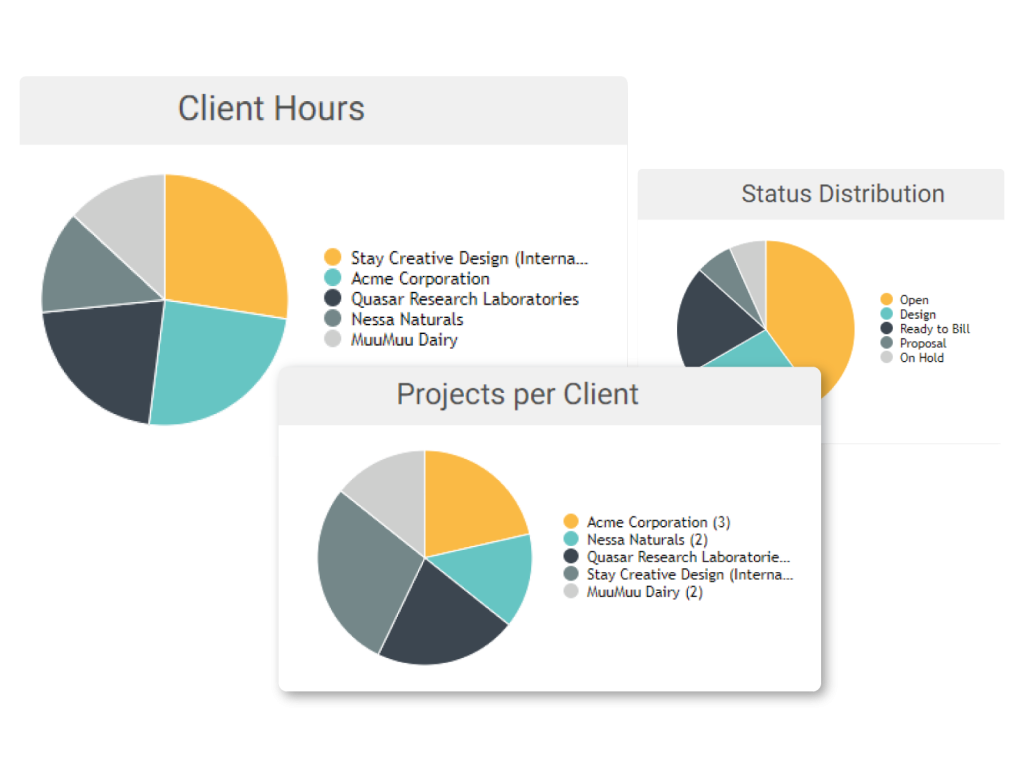
- Project and Task Tracking: FunctionFox facilitates the effortless creation, assignment, and monitoring of duties and projects. The ability to classify and associate each work with certain projects or customers facilitates invoicing and tracking.
- Milestone and To-Do List Management: The platform offers a comprehensive tool for managing project milestones, ensuring deadlines are met and helping teams stay on track with deliverables. To-do lists may also help you prioritize your daily chores and increase your productivity.
- Budget Tracking and Advanced Reporting: One of FunctionFox’s standout features is its budget tracking capabilities. Users may create budgets for each project, compare expected vs. actual expenditures, and receive comprehensive financial information to keep projects on schedule.
- Client Management: FunctionFox’s client management features make it easy to keep client data organized. This includes keeping track of project hours for precise invoicing, preserving customer data for later use, and producing reports tailored to individual clients.
- Mobile App: FunctionFox offers a mobile app compatible with both iOS and Android, allowing users to manage time tracking, project updates, and task assignments from anywhere.
FunctionFox Pricing
FunctionFox does not provide a free plan and has three different price tiers:
- Classic ($10/user per month, billed annually, 3-user minimum): This membership offers unlimited clients and projects, timesheets with a stopwatch timer, budget and estimate monitoring, retainers tracking, and extensive reporting among other key elements.
- Premier ($15/user per month, billed annually, 3-user minimum): It includes all of the Classic features as well as more sophisticated project management tools including actionable to-do lists, Gantt charts, availability and traffic statistics, and an internal blog for team communication.
- In-House (Custom pricing): incorporates all the features of Classic and Premier, as well as specialized reporting and request administration capabilities for large teams.
Comparison with Harvest: Pros and Cons
Pros:
- Advanced Project Management Features: FunctionFox has more complete project management capabilities than Harvest, including to-do lists, milestone tracking, and Gantt charts, making it ideal for complicated projects.
- Scalability: With multiple pricing tiers and options, FunctionFox provides tools that can scale with a growing team’s needs, making it a good choice for small agencies or larger creative firms.
- Streamlined Interface for Creatives: The interface is designed specifically for creatives, making it more intuitive and user-friendly for those in the design, marketing, and media sectors compared to the more generalized interface of Harvest.
Cons:
- Higher Price Point for Smaller Teams: In comparison to Harvest’s more cost-effective programs, FunctionFox may appear expensive to freelancers or small teams.
- Complexity for Basic Users: While its project management capabilities are extensive, they might feel overwhelming for individual freelancers or smaller teams who only need basic time tracking features.
Verdict as a Harvest Alternative
FunctionFox is a powerful Harvest substitute for creative teams in need of a complete time-tracking and project management system. Harvest works great for basic timekeeping and billing, while FunctionFox has more sophisticated project management features that are especially useful for creative workers. Its scalability and wide feature set make it ideal for growing creative enterprises and marketing teams that need to stay organized while managing several projects, clients, and deliverables. Harvest is a more cost-effective choice for small teams that simply need time tracking and billing.
2. Function Point
Function Point was designed with creative agencies in mind, with the goal of providing a comprehensive solution that includes project management, CRM, and financial capabilities. Since its inception in 1997, it has developed into a dynamic platform that is employed by advertising agencies, marketing teams, and creative businesses worldwide. Function Point provides an integrated suite of CRM, time tracking, and budgeting tools, catering to the distinct requirements of creative companies managing numerous customers and projects concurrently, where monitoring time and expenditures across accounts is essential.
Key Features
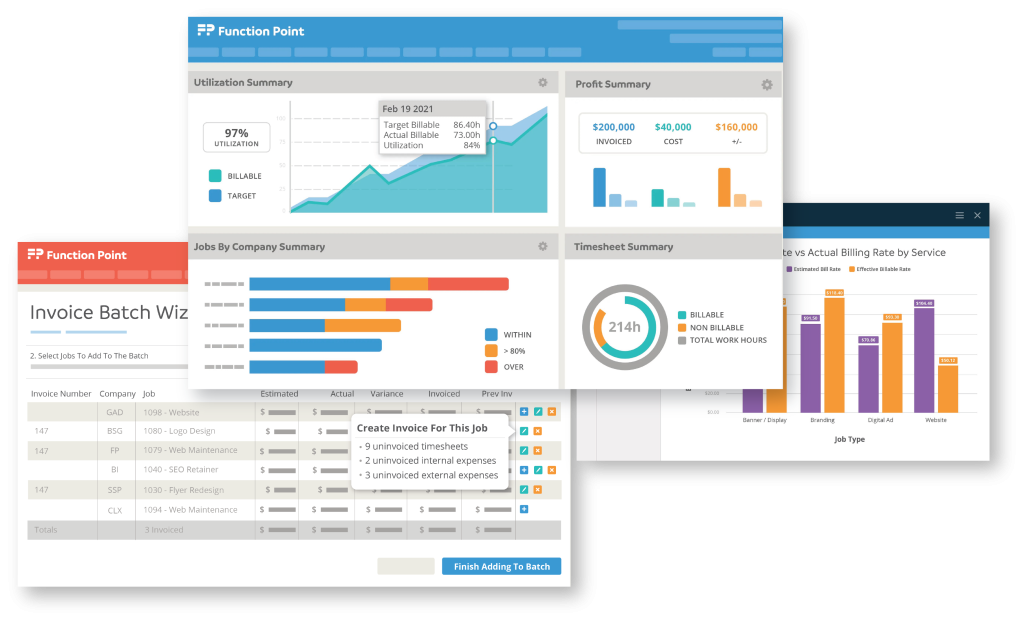
- Time Tracking Integrated with CRM and Project Management: Function Point combines time tracking with a powerful project management package that includes an integrated CRM. This integration enables teams to measure time spent on particular activities inside projects and link those hours directly to client profiles for easy invoicing and reporting.
- Client Management with Budget and Expense Tracking: The platform’s client management tools are specifically useful for agencies. Users can create detailed client profiles that track budgets, expenses, and profitability. This feature helps creative agencies manage multiple clients’ finances and budgets in one system, avoiding the need for multiple platforms.
- Customizable Reporting: Function Point offers customizable reporting capabilities that give insight into team productivity, project costs, and profitability. Users may generate and store custom reports, as well as utilize templates to track key performance indicators. Leaders can make data-driven decisions by generating reports based on specific timeframes, clients, teams, or projects.
- Project Management Tools: Function Point offers a set of tools for managing complicated projects, including Gantt charts, task dependencies, and Kanban templates. These features make it easy to visualize project timelines, monitor task progress, and maintain team collaboration, all within one platform.
Function Point Pricing
There are four price choices available from Function Points, each one may be tailored with add-ons for certain requirements.
- Boutique: $50 per user/month for 5-9 users.
- Studio: $47 per user/month for 10-29 users.
- Large Studio: $45 per user/month for 30-49 users.
- Agency: Pricing available by request. For 50+ users.
Comparison with Harvest: Pros and Cons
Pros:
- All-in-One Solution: Function Point’s integration of CRM, project management, and budgeting tools into one platform is a significant advantage over Harvest. This eliminates the need for multiple software tools, making it easy for agencies to manage client interactions, project timelines, and expenses in one place.
- Advanced Budgeting and Financial Tracking: Compared to Harvest, Function Point provides more sophisticated financial monitoring, including campaign planning, spending management, and profitability reporting per customer. For creative teams that must closely monitor costs in order to adhere to client budgets, these features are indispensable.
- Customizable Interface and Reporting: The customizable reporting and dashboard features allow teams to tailor the platform to their workflow, making it easy to monitor KPIs specific to creative agencies, such as billable hours, client profitability, and task efficiency.
Cons:
- Higher Cost for Smaller Teams: While Function Point is replete with features, its pricing may be prohibitive for freelancers or smaller teams who require only rudimentary time tracking and invoicing capabilities.
- Complexity for Basic Users: For agencies with less complex project management requirements, Function Point’s interface and extensive features may be burdensome. In contrast, Harvest provides a user-friendly and efficient interface that is easily accessible to freelancers and small teams.
Verdict as a Harvest Alternative
For creative agencies and larger marketing teams that necessitate a comprehensive suite of tools, Function Point is an optimal Harvest alternative. Harvest’s time tracking and invoicing capabilities are exceptional; however, it fails to incorporate Function Point’s comprehensive CRM, project management, and financial monitoring capabilities.
Function Point combines these features in one platform, allowing creative teams to handle all aspects of client projects, from time monitoring to budget management and profitability projections.
However, the higher price point may be a factor for smaller teams or freelancers who do not want the complete capabilities. Function Point provides a holistic, all-in-one solution to agencies managing many client relationships and complicated projects, dramatically improving project productivity and client management.
3. Monday.com
Monday.com is a comprehensive work administration platform that was initially developed to simplify the management of tasks and projects. Established in 2012, it rapidly expanded to become a top choice for teams of all sizes across industries as a result of its diverse range of functionalities and highly customizable interface. The platform is suitable for teams that need both flexibility and extensive project management skills, making it especially attractive to medium and large groups. In contrast to Harvest, which is primarily a time-tracking and invoicing tool, Monday.com offers a more comprehensive arsenal that includes features such as task management, collaboration, and extensive integrations, making it suitable for organizations that require more than just time tracking.
The adaptable workstation of Monday.com is particularly popular, as it allows teams to customize custom interfaces, workflows, and project views to meet their specific operational needs. Users have the option to utilize Kanban boards, Gantt charts, calendars, and other visualizations to intuitively manage project timelines and dependencies. Users can opt for Kanban boards, Gantt charts, calendars, and other visualizations, helping them manage project timelines and dependencies intuitively. It is a strong candidate for companies seeking a comprehensive solution to monitor projects and time across departments due to Monday.com’s flexible nature, which enables businesses to construct, measure, and manage complex workflows for product development, marketing campaigns, or resource allocation.
Key Features
Monday.com has a wide range of capabilities that enable organizations to create a work management solution that is specific to their requirements. Here’s a summary of its primary features:
- Customizable Dashboards: Project views, including timelines, Gantt charts, and Kanban boards, are available on the platform, allowing users to customize the visual layout to their liking.
- Automation and Workflows: By facilitating automated workflows, Monday.com helps teams save time and effort by eliminating mundane but necessary processes, such as creating task dependencies and sending out automated alerts.
- Task and Project Management: The platform lets users assign tasks, track project milestones, and visualize deadlines, making it easier to monitor project progression.
- Team Collaboration: Teams may use built-in collaboration capabilities to comment on tasks, tag colleagues, and exchange files, allowing for smooth communication throughout the platform.
- Integration Capabilities: Monday.com integrates with many third-party tools like Slack, Zoom, Microsoft Teams, and Google Drive, making it compatible with existing team workflows.
- Time Tracking: Teams can monitor hours spent on specific tasks or projects, helping them manage resources more effectively.
- Mobile Access: Monday.com’s mobile app allows users to track progress and collaborate on projects from anywhere.
Monday.com Pricing
Monday.com provides tiered pricing to companies of all sizes and purposes. Here’s a look at its main plans:
- Free Plan: $0/month. Up to 2 seats, 3 boards, unlimited docs, 200+ templates, and mobile apps.
- Basic Plan: $9/user/month (billed annually at $27/month for 3 users), includes unlimited viewers, items, and 5GB storage.
- Standard Plan: $12/user/month (billed annually at $36/month for 3 users), adds timeline views, guest access, and automations (250 actions/month).
- Pro Plan: $19/user/month (billed annually at $57/month for 3 users.) Private boards, time tracking, and extensive automation capabilities (25K actions/month).
- Enterprise Plan: Custom pricing. Advanced features like multi-level permissions and tailored onboarding.
Comparison with Harvest: Pros and Cons
Pros
Customization: Monday.com allows teams to tailor their workspace with various project views and automation features, giving it an edge over Harvest’s more limited interface.
Advanced Project Management Tools: Features like Gantt charts, Kanban boards, and dependency tracking provide a comprehensive project management toolkit, useful for teams that manage complex projects.
Collaborative Features: Integrated team collaboration tools like commenting, file sharing, and task tagging streamline communication, something Harvest lacks.
Cons
Complexity for Simpler Needs: Monday.com’s extensive features may appear excessively complex to teams that are in search of a simple time-tracking application.
Higher Cost for Advanced Features: Compared to Harvest, Monday.com can become expensive, especially for businesses needing automation, integrations, and advanced project management capabilities.
Verdict as a Harvest Alternative
Monday.com is a versatile option for teams that require a customizable and robust project management solution. It’s ideal for medium to large teams with complex workflows, multiple dependencies, and a need for seamless collaboration. Nonetheless, for small teams or freelancers primarily concerned with time tracking and billing, Monday.com may surpass their needs and financial constraints. In these cases, Harvest offers a more economical, straightforward choice. But for organizations that prioritize dynamic project views, automation, and collaboration in a single platform, Monday.com can serve as a powerful alternative to Harvest.
4. ClickUp
ClickUp, which debuted in 2017, has rapidly become a top productivity and project management platform due to its extensive set of capabilities, which allow teams to simplify all areas of their workflow in one location. Designed as an all-in-one solution for task, project, and time management, ClickUp is especially well-known for its adaptability and great degree of customizing, therefore serving teams of all kinds in different sectors. The platform’s development has concentrated on improving output by means of flawless project views, broad collaboration tools, and strong time-tracking capabilities thus enabling it to compete as a well-rounded Harvest alternative.
One of ClickUp’s most appealing features is its variety in task visualization, which includes numerous project views such as Kanban, List, Calendar, and Gantt. Each team may customize their workspace to reflect their chosen project management strategy, whether it’s a software development team utilizing Agile sprints or a marketing team handling campaigns on a schedule. ClickUp is most suitable for businesses that require a dynamic approach to project management, as it facilitates highly adaptable workflows with these tools. Additionally, ClickUp’s integrated communication tools—like real-time chat and collaborative document editing—add to its all-in-one appeal.

Key Features
ClickUp offers a variety of features, offering teams flexibility and control over their workflows:
- Real-Time Collaboration: Integrated tools for team communication, including real-time chat, comments on tasks, and collaborative document editing, help reduce the need for external messaging apps.
- Customizable Dashboards: ClickUp’s customizable dashboards let users display metrics, track progress, and manage reports, all personalized for team or individual needs.
- Time Tracking and Goal Setting: Teams can track time within the platform and set goals, milestones, and deadlines to monitor progress and ensure project objectives are met.
- Integrations: ClickUp effortlessly interacts with popular third-party technologies like Slack, Zoom, and Google Drive, enabling teams to use their chosen apps.
- Mobile App and Accessibility: The ClickUp mobile app makes project management available on the go, allowing users to manage tasks and stay connected from anywhere.
ClickUp Pricing
Designed to accommodate the requirements of teams of varying sizes and projects, ClickUp provides four primary pricing plans. Monthly billing increases each plan’s cost by approximately 30%. Here’s a summary of each plan:
- Free Forever: This free subscription, ideal for personal use, provides 100MB of storage, unlimited tasks, Kanban boards, sprint management, calendar views, real-time chat, collaborative documents, and 24/7 support.
- Unlimited ($7 per user/month annually): This plan is ideal for small teams, since it offers unlimited storage, integrations, Gantt charts, and custom fields, as well as native time tracking, resource management, and support for agile reporting and objectives.
- Business ($12 per user/month annually): This package is designed for mid-sized teams and includes everything in Unlimited, plus Google SSO, enhanced public sharing, task management, and timesheets.
- Enterprise (Contact sales for pricing): Customized pricing with high-level security, advanced permissions, and dedicated customer support, designed for larger organizations with specific security and operational requirements.
Comparison with Harvest: Pros and Cons
Pros:
- Affordability: ClickUp offers a competitive pricing.
- Customizable and Feature-Rich: With its customizable dashboards, integrated communication features, and multiple project views, ClickUp provides a level of adaptability that is suitable for a diverse array of industries and operations, making it an appealing option for larger teams with a variety of requirements.
- Integrated Communication: In contrast to Harvest, which emphasizes time monitoring and invoicing, ClickUp facilitates direct communication and collaboration within tasks, thereby diminishing the necessity for external tools.
Cons
Complexity for Smaller Teams: The vast range of features may feel overwhelming for smaller teams or freelancers who primarily need straightforward time tracking and invoicing, making Harvest’s simpler interface more suitable for such users.
Lacks Built-In Invoicing: While ClickUp covers project and task management well, it lacks the invoicing functionality that Harvest provides, requiring teams to rely on external tools for financial tracking and billing.
Verdict as a Harvest Alternative
For teams in search of a project management platform that is both flexible and offers a wide range of features beyond time monitoring, ClickUp is an exceptional substitute for Harvest. Teams in need of a comprehensive productivity platform will find it particularly appealing due to its affordable pricing and an impressive array of tools for task management, collaboration, and time monitoring.
However, its extensive functionalities can be a double-edged sword; smaller teams or freelancers looking for a more straightforward solution may find the platform overwhelming. Furthermore, the absence of invoicing capabilities may necessitate the use of a supplementary tool in conjunction with ClickUp for teams that significantly rely on accounting.
Overall, ClickUp is an exceptional option for businesses that prioritize collaboration and flexible project management tools in a single platform, particularly if Harvest’s emphasis on time tracking alone appears to be too restrictive.
5. Hubstaff
Hubstaff is a productivity tracking and time management tool geared toward remote teams. Unlike simpler time tracking solutions, Hubstaff includes GPS and geofencing features, distinguishing it as an option for controlling productivity in fieldwork and mobile teams. Since its beginning, Hubstaff has focused on assisting companies in properly monitoring their workers, including features such as employee responsibility, time tracking, and invoicing, as well as some project management essentials.
Key Features
Hubstaff has multiple features that cater to remote and dispersed teams, making it very flexible to different work contexts. Several of the core features are as follows:
- GPS Tracking and Geofencing: GPS monitoring enables the logging of team members’ locations during work, thereby guaranteeing precise time entries, particularly necessary for fieldwork. Geofencing allows the system to log hours automatically when employees enter or leave specific locations, adding convenience and security for businesses with mobile staff.
- Productivity Monitoring: Hubstaff offers administrators the ability to evaluate the productivity of both individuals and teams by providing productivity insights through activity rates, screenshot capturing, and application monitoring. This function is configurable, allowing organizations to choose the amount of monitoring information that meets their privacy and operational requirements.
- Time Tracking and Project Budgeting: Time tracking is Hubstaff’s main feature, allowing for detailed tracking at the project level. Budget tracking tools help businesses allocate time and financial resources across multiple projects, assisting in keeping expenses on track.
- Invoicing and Client Billing: Hubstaff enables businesses to streamline their billing processes by automatically converting logged hours into invoices for clients. This is especially helpful for freelancers and remote businesses that need to manage various client accounts efficiently.
- Mobile and Desktop Apps: Hubstaff’s desktop and mobile applications enable remote and mobile teams to collaborate. The applications enable tracking, reporting, and monitoring from any location, allowing remote and field personnel to access all necessary resources without the requirement for a central office setting.
Hubstaff Pricing
Hubstaff’s pricing plans provide alternatives for teams that want varying degrees of monitoring and project management functionality. These are billed annually, and if billed monthly, rates increase by 16%. Here’s a breakdown:
- Starter: $4.99 per seat/month (2 seats minimum). This plan includes basic time tracking, timesheets, limited screenshots, app tracking, and invoicing. It also offers two-day email support.
- Grow: $7.50 per seat/month, offering everything in Starter plus idle timeout, task management, one integration, project budgets, expense tracking, and one-day email support.
- Team: $10.00 per seat each month, which includes unlimited screenshots, app monitoring, payments, payroll, scheduling, and chat support.
- Enterprise: $25.00 per seat/month with enhanced features, including enterprise deployment, single sign-on, HIPAA compliance, and an assigned account representative for support.
Comparison with Harvest: Pros and Cons
Pros:
- Advanced Tracking Features: GPS monitoring and geofencing are notable features that enable remote teams to reliably track both on-site and off-site productivity.
- Activity Monitoring: For teams needing a detailed productivity breakdown, Hubstaff’s activity monitoring offers insights into productivity through screenshots and application usage, which is beyond Harvest’s capabilities.
- Invoicing and Project Budgeting: Hubstaff’s invoicing and project budgeting capabilities offer a streamlined way to bill clients and manage budgets based on logged hours.
Cons:
- Limited Project Management Tools: Hubstaff lacks advanced project management features like task dependencies, which Harvest and more comprehensive tools include.
- Fewer Integrations: While Harvest integrates smoothly with a range of project management tools like Asana, Trello, and QuickBooks, Hubstaff offers fewer integration options, which may be a limitation for businesses relying on specialized third-party software.
- Less Focus on Freelancers and Small Teams: Hubstaff’s comprehensive monitoring and tracking tools are better suited to larger remote teams or businesses with mobile staff, whereas Harvest may be more adaptable for freelancers and smaller teams needing simplified tracking.
Verdict as a Harvest Alternative
Hubstaff is an ideal Harvest alternative for remote or field teams that require GPS tracking, geofencing, and robust productivity monitoring. Its features support the demands of teams on the go or working in dispersed locations by adding layers of accountability and visibility that Harvest lacks. The app’s invoicing and project budgeting features make it a feasible option for firms that need time tracking and basic project financials. Harvest may, however, provide a superior experience for firms focusing on complex project management or those searching for a simpler time tracker.
Conclusion
The market for time tracking and project management solutions is full with possibilities catered to satisfy a range of demands beyond what Harvest provides in 2025. With sophisticated project management and monitoring tools that are perfect for agencies and creatives managing several customers and challenging assignments, FunctionFox stands out as a great option for creative teams.
Function Point provides a comprehensive, all-in-one solution that incorporates budget management and CRM in addition to FunctionFox. This solution is capable of supporting agencies that manage larger client bases. Monday.com offers a fully configurable platform with dynamic views and automation, making it ideal for enterprises that need project visualization tools like as Gantt and Kanban boards. ClickUp is an economical and adaptable option for teams looking for an all-in-one solution with full project views, but Hubstaff caters to remote teams with unique productivity and GPS monitoring, bridging the gap for teams who want real-time insights into distant work activities.
Selecting the right tool comes down to team size, budget, and specific project needs. Whether it’s for a small team seeking simplicity or a large agency in need of extensive project management capabilities, these alternatives present robust options to consider. As businesses navigate the evolving landscape of project management in 2025, these tools highlight the industry’s shift towards more specialized, feature-rich solutions, each helping teams stay organized and focused on their goals.